Pages

Showing posts with label ElectrifiedRoadTrip. Show all posts

Monday, October 26, 2026

So, How is the Tesla Now? Part 3: Elon, Autopilot, Dealership Racket... And an Answer

 After rationing our final warranty miles and digging through the data in the first 2 parts; now its time to answer the big question of this series: after three years and two months with our 2023 Model Y, would I buy another Tesla right now?

     I have to admit, over the past few years, Elon Musk has made me nervous. In 2023, when we decided we wanted to get an electric car, I started with the position of anything but a Tesla.  My biggest hesitations was Elon Musk; this was still pre-D.O.G.E. so my concerns were more along the lines of digital consumer rights (when the car is software, the manufacturer has a lot more control after you buy the car thanks to DRM) and Tesla keeps a lot of control over the car through software after the sale. My fears hit home when Tesla changed the Autopilot features; if you bought a car before 2025, the included autopilot features were amazing, but now its a shell of what it used to be; we actually pay the monthly subscription for Full Self-Driving - do that didn't really impact me - however, it sets a dangerous precedent.

     At the same time, driving the Odyssey lately proved that I never want to buy another gas car, and honestly, we are ready to get rid of having a gas car altogether. The situations where we actually want a vehicle that drives 500 or 600 miles without stopping can be counted on one hand in the past 3 years; its honestly more of a hassle to go to a gas station than its worth.  However, what about Tesla's competition?

     Once you commit to an EV, the question shifts to why I would pick a Tesla over another electric car, and to really determine that, you need to talk about features.  First, nobody makes a feature to compete with Full Self-Driving - nobody in the US at least, China is a different story.  I use FSD (Supervised) for 78% of my Tesla driving (according to my driving profile in the car), and on those drives I can pull a lever and let the car handle roughly 99% of the steering and braking; lucky for me, I am a professional back seat driver just like my mom, but whenever I do intervene, it is almost always over lane preferences rather than a close call. It still does dumb, annoying stuff all the time: it changes lanes without a good reason, exits the carpool lane too early or too late, and forces me to toggle between obnoxious driving profiles like Mad Max and Sloth because you can't just set a plain 65 mph cruise speed and tell it to pass slow cars.

     Even with those quirks, I haven't found an equal for surface streets and highways combined. The closest features in the US are geofenced to specially mapped areas rather than a real universal end to end automated driving system.  Even the Level 4 autonomous systems - you know Waymo - require detailed 3D mapping in small geofenced regions and call center workers to monitor and take control of the cars, so they aren't even at the level of Telsa's autopilot in practice; its just, the person in the car doesn't have to monitor and be ready to take over at all times - the call center employees do (fun smoke and mirrors game though).  I know the driver still has to monitor Tesla FSD in privately owned vehicles at all times and be ready to take over, but in practice its more like Tesla didn't get regulator approval to remove the warning outside of a couple small geofenced areas.  So, it is level 4 in those geofenced areas, and level 2 everywhere else.

     Two other practical advantages still hold weight for me too. First, while some base EVs like the Ford Mustang Mach-E are cheaper than a base Model Y; when I cross-shopped legacy automakers like Ford, Hyundai, Honda, and VW, many conveniences that come standard on a base Model Y trim still require stepping up to the top trim packages. This means the $35,000 Model Y should be compared to the $80,000 competition.  Second, there is the buying experience itself. When you buy a Tesla, you just open the app on your phone, order what you want, and pay what it costs without sitting in a dealership back room while a salesperson pressures you into add-ons; I still don't know why buying a car isn't like that everywhere.

     So my final verdict is an honest, slightly conflicted yes: I still worry about what software changes Elon might push down the road, and I wish every automaker sold cars directly in an app; yet I would still buy another Tesla today.  Integrations into Home Assistant are a big selling point for me, FSD has been amazing, performance is wonderful, and the total cost of ownership can't be beat.  I do hope there will be competition for Tesla some day, but I don't see that even existing in a number of way right now. 

     On a slightly different note, I will probably have a follow-up soon after we see what our $500 inspection turns up.  Maybe it will be nothing and I'll be out $500 bucks, or maybe it will find some huge issue we didn't know we should fix!  Either way, the past few years speak for themselves.

Later,

     SteveO

Friday, October 23, 2026

So, How is the Tesla Now? Part 2: The Telemetry Truth

     Welcome back to Part 2 of my 3-part retrospective on approaching 50,000 miles in our 2023 Tesla Model Y. In Part 1, I covered rationing our final 137.2 warranty miles before a $500 inspection and the painful rev-lag of driving our Honda Odyssey all week; today, we are digging into my Home Assistant and TeslaMate telemetry before Part 3 wraps up with Full Self-Driving, Elon Musk, and whether I would buy another Tesla right now.  I am pretty sure I will have more to say about this after the inspection is done, but as I'm trying this format of writing a bunch of posts and scheduling them to be published, I haven't dropped it of yet, so tune back in next week for that part.

     Anyway... back in August 2023 (at 1,014.5 miles), I spun up TeslaMate alongside Home Assistant to log every drive locally. There is a side quest there about the drama around the original developer of TeslaMate leaving the project and having to spin up a separate docker container and database to host it outside of home assistant; however, I'm not getting into that here (maybe that will be a future topic).  So, across 6,838 drives and 48,848 tracked miles, I collected some data!

     In that time, the car pulled 20,833.4 kWh from the wall (18,546.0 kWh into the battery after 11% charging overhead), averaging 427 Wh/mi wall-to-wheel (380 Wh/mi driving). Even after Puget Sound Energy raised rates from 13.88 cents to (15... 18...) 21.66 cents per kWh (the 3 biggest increases in electricity rates in their history!), our entire 3.5-year electricity total is $3,249.22; working out to 7.6 cents per mile at home (86.9% of our charging) and 8.4 cents per mile if you include the $849 spent at superchargers across the country. Battery degradation stayed boringly flat too, easing from 278.7 rated miles new to around 260 to 266.8 miles today (just 4.3% to 6.5% loss).

     Meanwhile, our 2018 Honda Odyssey usage completely collapsed. Before the Tesla arrived, the Odyssey averaged 1,068 miles per month at 19.3 MPG (costing 22 to 23.9 cents per mile). Once the Model Y took over at 1,289 miles per month, the minivan dropped 74% to just 276 miles per month. Driving those Tesla miles in the Odyssey would have burned 2,531 gallons for $11,023.14 - meaning the Model Y saved us $7,233.60 in fuel and kept 22.4 metric tons of CO2 out of the air (even more if you add in the costs for oil changes).

     In the winter, the Model Y AWD is a beast in the snow. We logged 30 ski trips (4,390 miles) up to Stevens Pass down to 13.9 F without needing a Supercharger on a full home charge. Around 35,000 miles, we swapped the factory tires (Pirelli Scorpion MS) at Costco for EV-optimized tires (Bridgestone Turanza EV) before ski season; they are quieter than both the factory tires and the Odyssey's tires (Michelin CrossClimate2), though the Bridgestone tires seem to have traded away about 14% in range (moving winter consumption from 404 Wh/mi to 467 Wh/mi).

     For longer trips, we can drive non-stop from Seattle to Vancouver, BC on a 100% charge and arrive with nearly 42% left.  Enough to get us around Vancouver for the day before topping off at one of the local superchargers (those BC superchargers are even cheaper than charging at home FYI).  Last summer, when a ferry issue forced us south through Olympia and Aberdeen to camp at Bogachiel State Park (575 miles with a roof rack and ski box full of camp gear and four bikes on the hitch rack), I plugged into the Forks Supercharger past midnight while the kids slept; recharging from 27% to 78% and decompressing before pitching the tent at 1:00 AM (while a shorter 337-mile Fort Flagler camping trip only needed a very short public charging stop to top off). Even the scary 12V battery error we saw in Worthington, Minnesota during our 5,531-mile winter trip to Michigan was just a quirk from using a bad CCS charging adapter at a third-party station... and Lynnwood Tesla Service checked on it and found nothing wrong, but gave me a Model S loaner overnight.

     The telemetry is hard to argue with; gas cars can't even compete.  I have also found most of the fear mongering is just plain false (waiting forever to charge, eating tires, range anxiety - which we did have that with Renmin's old Nissan Leaf 12 years ago - all that is just noise now.)  Even the Insurance issue, which was a real problem when we first got our Tesla (Progressive doubled our insurance twice!)  but now we found out that some insurance companies were just milking the hype to make a quick buck - we pay the same rate now we did before the Tesla.  

So, I'm pretty sure I went way over 500 words here.  So tune in next week for Part 3, we need to talk about Elon Musk's software changes, Full Self-Driving's personality quirks, and my final buying verdict.

Later,

     SteveO

Thursday, October 22, 2026

So, How is the Tesla Now? Part 1: 50,000 Miles in...

     So, I am trying this new format.  I have had some time to think, and I kept writing these massive walls of text; then I thought, ok, I'm sure everyone loves reading massive walls of text, but hear me out.  What if the wall of text had a 500-ish word limit?  So, I tried that over the weekend, and I'm scheduling posts for 10AM each day.  I don't know how well this works, but I'm trying it.  

     That being said, this post is Part 1 of a 3-part series following up on my 2023 Electrified Road Trip posts and The Test Trip V1 after three and a half years with our 2023 Tesla Model Y. It will take three posts to reach my final verdict in Part 3, because while this is easily the most fun vehicle I have ever owned, a few things over the past couple of years have left me genuinely conflicted. Today in Part 1, we are starting with why I suddenly parked the Tesla for a week right before hitting 50,000 miles; in Part 2, I will pull our real-world cost and trip telemetry out of Home Assistant and TeslaMate; and in Part 3, we will tackle Full Self-Driving, dealership games, and whether I would actually buy another Tesla today.

     Right now, the odometer in my TeslaMate dashboard sits at 49,862.8 miles; meaning I have exactly 137.2 miles left before the 50,000-mile basic factory warranty expires. After reading a couple of articles about Tesla owners who scheduled a detailed service inspection right before their warranty cutoff and caught multi-thousand-dollar suspension or hardware repairs while Tesla still had to foot the bill, we booked the $500 comprehensive inspection.

     Booking that appointment created a funny logistical problem: with under 200 miles of buffer left before our service date, we had to park the Model Y for the week so we wouldn't cross 50,000 miles early. Normally, my daily routine is dead simple. I set the charge limit to 60% and plug the car into our charger every night just like charging a cell phone. Daily school runs and local errands only drain the battery down to 55% or 50% (honestly, I could charge it on Sunday night and coast through the entire workweek without touching the cord, yet plugging it in nightly became an easy habit).

     To save those final 137.2 miles, we went cold turkey this past week and drove our 2018 Honda Odyssey everywhere - and boy, was that a rude awakening. Before the Model Y, I always drove a minivan (Chevy Astro, Pontiac Montana, Honda Odyssey) or a 2008 Honda Accord, so the Tesla was already the sportiest car I had ever owned by a long shot. When you drive a gas car every day, you never notice the delay; however, once your brain gets wired for an electric motor that moves the exact instant your foot touches the pedal, going back to a gas engine feels sluggish. You press the gas pedal in the Odyssey and wait a full eternity while the engine revs up and decides whether it actually wants to move the van. Any electric car will spoil you this way... and it makes me never want to drive a gas car again.

     Parking the Tesla also highlighted how differently the two vehicles handle maintenance and recalls. Over the past three and a half years, our Honda Odyssey has had eight separate factory recalls; every single one meant dropping the van off at the dealership overnight (or for two full days while we juggled family rides). By contrast, nearly every recall on the Tesla was an over-the-air software update that fixed the car in my driveway while I was asleep.

     Ironically, we did just get our very first physical hardware recall on the Tesla to replace the headlights. Just like an active Honda recall where we couldn't get the part, the replacement Tesla headlights are currently on back order; which makes me wonder what would happen if my headlights actually burned out tomorrow (would I just be stuck with a car I can't drive after dark... during a time of year with 4 hours of daylight per day?!??).

     Anyway... while the Model Y sits parked in the driveway saving its final warranty miles, Part 2 will open up my Home Assistant and TeslaMate database to see what 20,833 kWh actually cost us, how badly the Odyssey's usage collapsed, and how the car handled 30 mountain ski trips - all building toward my Part 3 verdict.

Later,

     SteveO

Monday, October 23, 2023

The Test Trip V1


     Over the past couple of months, we have been getting used to mostly driving an electric car.  It has become clear that our daily driving needs are more than met by having a Tesla and charging at home over night.  Our normal daily activity can actually be exceeded with a 110v 15 A mobile charger, but having a 220v 48A wall connector gives us flexibility to guarantee we can fully charge a completely drained battery over night.  So, at this point, I am trying to put myself into a situation where I need to charge;  technically, I didn't really do that yet, but I was a little nervous testing the limits of the battery while taking my family through a mountain pass with occasional drops in cell phone reception.

     So, to keep this kind of data focused, I created a Grafana Dashboard for the trip.  The dashboard itself was 99% created by TeslaMate, and I filtered the data from the time I parked my car the night before until I got home.  I included just a couple minutes of charging after I got home to make sure I had the final battery percentage in the tables.  I hope you enjoy!  


     So, moving to the trip, my original plan was to charge the battery to 100% over night, drive over a 4,000ft mountain pass to the village of Leavenworth that is about 100 miles away, charge at that location while hanging around town for the day, then drive home along the same route. It turns out, as soon as my kids learned they can watch shows on the screen while parked at a charger, they insist that we let them watch as soon as we plug in.  This was okay with me, as it gave me some time to get out, stretch my legs, and walk into a nearby market that actually had normally priced products.  There were 13 chargers at the station, and only about 5 of them were occupied by vehicles charging.  One was occupied by someone who parked their Tesla at the charging station but was not charging their car.  Very rude, and poor etiquette.

The total trip distance turned out to be 221 miles, and it cost me about $13.90 for electricity.  By contrast, if we had made the same trip in our Honda Odyssey, the 11 gallons of gas would have cost us about $55 based on local gas prices, which hover around $5/gal if you shop at Costco or a grocery store.  As I'll cover a little when going over the charging, you will see I could have cut nearly 25% off of the electricity costs if I were more aggressive with my battery.


     I had set the wall adapter to charge the car as slowly as possible the night before.  I don't know if this actually matters, but I have never charged the car to 100% before, and wanted to put as little stress on the battery for this first trip.  It ended up taking around 10 hours to charge, but I could have done it in 3 or 4 hours if I maxed out my Tesla Wall Adapter.  You may also notice that when I charged in Leavenworth, I added 30% capacity to the battery, and I returned home at the end of the day with 43% capacity.  This means I did not need to charge the car at all that day, and I could have either completed this trip on a single charge; meaning I could have saved $3 by charging at home compared to using the charger in Leavenworth.  Alternatively, I could have charged the battery to 80%, and put less wear and tear on the battery by not charging to 100%.  So, it turns out this trip, which apparently a lot of people think is too long for a day trip, 
 

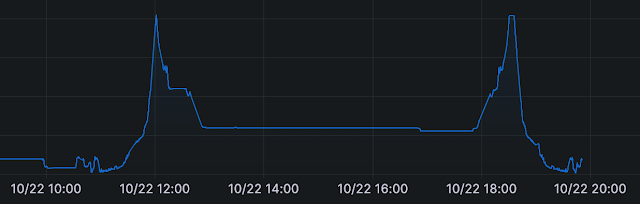
     Here I take a look at my battery state of charge for the trip.  I had gone a couple days before the trip without charging, which is why the battery was under 40% the night before, and you can see I slowly charged the battery over night.  This was done by setting the charger Amperage to try and target my originally scheduled departure time of 8AM; as usual, the family did not like to wake up in the morning, so our actual departure time was a couple hours later.  Our power usage increased steadily as we traveled over the mountain pass, then leveled off after crossing Steven's Pass.  The majority of the time, we were traveling 55-60MPH the entire time, but I don't think anyone would be surprised to hear that mountains effect battery consumption.  We charged up in Leavenworth before parking and hanging around town for the day.  Finally, you can see on our way home, we used a lot of battery initially on our way up the pass, and actually regained about 3% going down the other side.  The weather was dark and fogging going down the west side of the pass, so we actually slowed down to around 45MPH.  Regenerative breaking was used to maintain speed, and this resulted in a little boost.


     Finally, here is the elevation chart.  I cut off the left side because it was a long line sitting at 387 feet.  You can see the mountain pass was about 4,000 ft high, and Leavenworth is about 1,100 ft in elevation.  you will also notice right around noon, we stopped at a rest area for the kids.  Like I have read many others report, we need to stop for bathroom breaks far more often then we need to stop and charge the car. You can also see while in Leavenworth, we moved the car down by the river at about 17:00 so the kids could play in the park for about an hour before we drove home. 

     In conclusion, the Tesla was perfectly suited for this type of trip.  I also have no doubt that most electric cars these days would have a similar experience.  There is an Electrify America charging station just a couple blocks away at a grocery chain across the river from the Tesla chargers, but I didn't actually investigate to see if it was good.  I will also noticed that several hotels in the area have destination chargers, which could be nice if you were staying overnight; however I have no experience with that.

     In hindsight, I think I should choose a slightly more challenging route for a road trip in preparation for our cross country journey.  Maybe something with an overnight stay that requires stopping to charge in both directions to reach our destination.  We also primarily drove 2 lane highways for this trip, and I've heard that Interstate highway travel uses more battery.  So, until the next phase in my electric car journey, I will go back and plan something.

   One final note about the driving experience.  As I commented to my wife at one point, the Tesla pretty much drove itself on Basic Autopilot for the entire trip.  I had my hand on the wheel, and there were 2 or 3 disengagements where I didn't like the way the car was handling some of the sharper turns, and I often found myself uncomfortable with how close to the center line the Tesla would drive.  I am confident it was just keeping the car centered in the lane, but I do prefer hugging the outside line when going 60mph on a 2 lane road; I just don't trust the other people to stay on their side that much.  However, the basic autopilot functionality did surprisingly well on those curvy mountain highways.

So, that's all for now.  I will start planning for a longer road trip, but I'm really starting to feel good about this cross country trip!


Later,

     SteveO


Tuesday, September 12, 2023

Anywhere You can go, I can go cheaper!


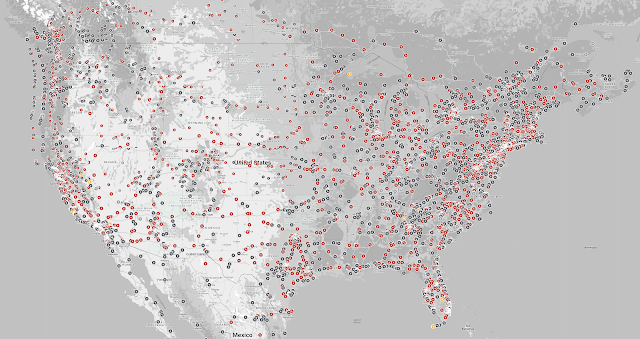
     I have been testing the waters more and more as I drive further in my Tesla; then today Tesla announced they built their 50,000th charging station.  Here is a link, if you care to see the interactive version of the map above.  So, looking at the availability of all these chargers and hearing testimonials from people who actually drive their Teslas across country makes me feel pretty confident about going on this trip this winter.  

     Certainly sounds much better than the horror story of Granholm's caravan blocking EV chargers with a gas car. This is an unethical practice called ICEing (verb, ICE = Internal Combustion Engine); in this case they ICEd a family with a baby when her advance team blocked a charger they planned to use for the caravan.  Although, part of her problem is that she had a fleet of cars traveling to showcase electric car usage.  Which was compounded by the fact that most private charging stations have issues (broken or vandalized chargers are huge problems here.)

     One reason using a tesla charger is generally a better experience is the lack of user interface on the machine itself.  When you plug the charger into your car, there is a data connection between the charger and the car, and the car itself initiates the charging session.  This means you don't need to install an app on your phone, or log into a server to start the charging session.

  This weekend, It went to Electrify Expo Seattle, and had some interesting conversations with the companies putting on the show.  I was surprised to find out that most of the bicycle vendors had little to no down time on their electric bicycle fleets as they offered test rides to an endless line of people eager to give the bikes a ride.  I was especially excited about the Riese & Muller cargo bikes; the ones with the big box in the front that can fit both of my daughters side by side in them.  Those were pretty fun to ride, especially the Load 75 which could actually fit 3 kids, but that $10,000 price tag will prevent me from getting it.

     The main focus at Electrify Expo is really the cars, and the test drive track!  It was fun to compare the acceleration on on the Model X Plaid to the Porsche Taycan; its close, but I think the Model X wins.  I was also excited to take a good hard look at the Ford F-150 Lightning, which is a pretty impressive truck.  While Ford is supposedly switching to NACS (aka the Tesla port), and they are working with Tesla to work out billing for charging, but right now they still use the CCS connector.  I think getting everyone on one charging port is really important, and because it seems like a lot of companies have agreed on NACS, we should just do that and move forward.

     So right now, I look at the map above, and feel like it would be easy for me to get across the country in a Tesla.  I also like seeing all those destination chargers (the gray dots), which are slower chargers at hotels that are intended for overnight charging while you sleep.  Those could be great for topping off if you drive ~50 miles past your charger before stopping for the night.

     The biggest "concerns" I hear are from people who don't have electric cars telling me that its not a good idea yet.  However, I think the majority of Tesla owners are confident in the Tesla super charging network.  Additionally, I'm hoping to find a couple of those new Flying J stations that have electric charging stations too, that could be pretty sweet!  So, getting closer to the drive, and I'm pretty excited about it!


Later,

     SteveO

Monday, August 28, 2023

Electrified Road Trip Part 2: Tracking with Teslamate


In preparation for my big road trip, I added Teslamate to my Home Assistant setup.  I have to say, I am sad that I didn't do this on day 1.  This little platform is amazing, and it not only gets a huge amount of data out of Tesla's cloud and on to my own hardware, but it also generates some wonderful Grafana dashboards too!  It is kind of a game changer compared to the way I have collected stats from my current car, and just using the unofficial Tesla Integration for home assistant.

So, the integration's main screen doesn't look like anything special.  The map shows the real time location of the car, along with some basic stats about the car.  You can also use Geo-fences to give common locations any name you like, and you can even set a charging price for the location.  This is particularly useful for charging at home because there is no receipt for purchasing power like you get from a charging station.  I will get into manually updating charge prices once I figure that out, but I rarely charge anywhere other than home, so it is a low priority task for me to sort out.

The real advantage comes with 2 backend features this plugin provides.  First, the plugin integrates with a database to log all your data about your car.  This data goes far beyond just what you see on the plugin page, and this is why Grafana is the real hero for this plugin.  The second feature is MQTT, which is just a protocol used by IoT devices to communicate updates.  Once you have these two features, you can create dashboards in Grafana to visualize the data and create reports, and MQTT sends the data to home assistant so I can trigger events based on the reported stats.

To the right I show MQTT explorer, which shows an example of the message data Teslamate sends to Home Assistant.  This data gets updated in real time, and one thing this does for me is update any time the car is unplugged from the charger immediately, rather than having to wait for the integration to poll Tesla for the data, which can take anywhere from no time to 5 minutes.  One problem this caused me a few times is that I would unplug my car, and have Home Assistant log the data to a google sheet; however, if the data didn't get logged immediately my car would not be at home when the data was logged, and my cost estimates would be off.  I guess Teslamate removes the need for this Google Integration too, which I appreciate reducing the number of cloud dependencies I have.

Possibly the best part of the this addon is Grafana Dashboards!  For those who don't know, Grafana is a web application that can collect data from databases and organize it into Dashboards, which are a collection of charts, graphs, and data.  It is somewhat popular for its ability to collect data from many places and combine it all together into a single screen/report that is full of pretty pictures.


Teslamate has a bunch of dashboard that is loads into Grafana if you set it up correctly.  Its a great way to visualize things like your most recent trip data and commute data.  For example, this image shows a track for everywhere I've driven this month. When I scroll down through the list of drives I've made, I can tell that I drive the same few routes over and over again, and it gives some nice summary information like how efficiently I drive (256 Wh/mi) and the fact I have paid about $13 to drive my car 265 miles (which is WAY cheaper than gas).  Just getting access to this data is a critical asset to accurately estimate my personal cost of driving the car, and having a few months of data under my belt will give me a clear picture of how far I can drive my car on a single charge.

For those interested in the process of getting this all set up, I added 3 home assistant add-ons using the instructions on the mat-FFFFFF github repository here.  If you are savvy with docker and have a spare raspberry pi laying around, I have to admit most of the troubleshooting resources online focus on putting everything into its own container.  However, its not too difficult to follow the directions and get it all setup, but maybe that could be a good thing to write about next.  Let me circle back around to that once I get around to refactoring a couple things for best practices.

Anyway, that's it for now.  Until next time.

Later,

SteveO

Friday, August 18, 2023

Electrified Road Trip Part 1: A tale of two maps


So, we recently became the owners of a new Tesla Model Y.  We went with the base model, and only paid to change the paint color and add a trailer hitch (mostly for a bike rack.). I have actually plotted this trip twice so far.  Once with the Tesla App, and again with abetterrouteplanner.com (ABRP for short)

I have to admit, I like ABRP more, so it seems to live up to its name.  The nice thing about both tools, is they break the route into legs, where you need to stop at a charger.  They also both had some functionality for estimating charge times, and how much to charge the battery to make it through the next leg of the trip.  However, beyond that, the two. apps start to show their differences.

The Tesla app is nice because its built into the car, and you can start the navigation on your phone, then send it to the car before you get in.  The way Tesla has built their ecosystem it feels like this is how you are supposed to do it.  The biggest limitation is that its built for you to plot your course and go now, and it also seemed to demand the full potential of the car too.  It would frequently use 80-90% of the battery to get you a longer distance, and it the charge times were much longer at each stop.  I didn't find a way to change this in the app, but its also possible I missed something.  The last gripe I have is that it doesn't show the amenities at each stop from the route screen; if you write down the chargers, then navigate back in the app you can see a row of icons indicating things like bathrooms, food, or shopping near by, but the app doesn't indicate if these things are walking distance from the charger.

ABRP on the other hand has a limitation in that it doesn't work natively on the car; it is a web page, so you can load it in the car's browser, but you lose some features if you do that, like Tesla's built in ability to prep the battery for the supercharger before you arrive at the station.  However, you can export the route to Google Maps, Apple Maps, or a Calendar, which are all ways that you can import the suggested stops into the Tesla's built in navigation system (Tesla also has a feature will it will automatically navigate to your next calendar appointment when you get in the car.)

ABRP also allows you to export the stops to a spreadsheet (or view the table in the browser) that outlines all the data you could want.  The battery charge you will have on arrival and charge you need to make the next station, estimated charging time, estimated cost, distance to the next station, and drive time.  This is basically an itinerary to review the trip and choose the stops you want to make.  This is also highly adjustable.  You can set the range of your vehicle on a full charge, set min and max limits for how much to charge the battery (I I try to keep it between 20 - 80%.). There is also an adjustment to set if you want more stops with shorter charges, fewer stops with long charges, or optimize for the quickest trip.

Once you create your route, you can click on each charging station to see what types of amenities are near by.  It will tell you if there are bathrooms, its dog friendly, has a playground, or is trailer friendly, and it will clarify how many food options you have with names, phone numbers, web sites, and a distance from charger.  The map view will use OpenStreepMap data to show you that the restaurant is only 800 ft away, but its across the interstate, so its more like a 1/2 mile walk.

This is a planning tool to help you know if its better to stop in Ellensburg and Mosses Lake, or push your battery a little more and go straight to Quincey.  A quick conclusion on that scenario will tell you there are multiple restaurants very close to the chargers in Ellensburg and Mosses Lake, but the one in Quincy is the 1/2 mile walk I talked about in the previous paragraph.  I also learned that there are two chargers in Ellensburg, one at 150Kw and another at 250Kw.  Now, those are both Tesla chargers, so it would be visible in the Tesla app too, but the tesla app seems to leave a lot to be desired during the planning phase of the trip.

So, you may have noticed I've left out the elephant in the room; most people use Google, Garmin and Apple maps for navigation.  Well, as a Tesla owner, there really isn't a convenient way to use any of those maps (well, technically the map data in a Tesla comes from Google.)  The big beautiful screen in the car doesn't support Android Auto or Apply CarPlay; a huge negative for any car these days.  So, for those who buy an electric car from any other car maker, you will have that experience at your finger tips.  However, you can't actually tell Google/Apple/Garmin maps to route your trip to include stops for electric chargers, calculate the charge time for those charger, or calculate the cost of charging.  However, the ABRP Android app uses Google Maps for its backend, and the Apple version of the app uses Apple Maps data; so that is worth mentioning.

Speaking of the app experiences, I think its clear at this point I am biased in favor of ABRP.  The Tesla experience for trip planning is okay, and its roughly the same in the web browser, mobile app, and on the car.  Actually, I think you get a little more google map data in the car than the phone or browser, but I think that's by design.  A great thing about using the phone is that all map programs have a nice feature to send a location directly to your tesla;  I use this all the time.  I often look up current travel time (including traffic) before I get in the car, so having a nice share button to tell my car to navigate there when I get in the car is amazing!  This is a tiny thing that makes me happy multiple times a day.

So, back to the ABRP mobile app.  I started by visiting the website on my computer and plotting my course.  I took that course and investigated which chargers had the amenities I wanted near by to help keep the kids and dogs happy, and now I am going back to the app to create a route with waypoints at my desired chargers.  I can also add a stop at a hotel.  This was very easy to do, and I created a free account to save my plan.  On my phone.

So, this concludes the planning phase of this road trip.  However, before the real trip, I am going to test out my theories with a smaller trip.  I will be faced with the decision:  can I count on my family to stick to a plan using calendar events for each charger?  The advantage here is that the Tesla would (in theory) sync my calendar, and load the next charger every time we get in the car.  However, this could fall apart and become unwieldy if we don't stick to a schedule; for the record, my family NEVER sticks to a schedule.  

The alternate plan would be to send the tesla the location of the next charger from my plan every time we leave a charger.  This might work, but could fall apart if cell service to either my phone or the tesla is unavailable.  We will just need to try and test it I guess.  Until the next phase.


Later,

     SteveO